AI Crawlers Are Already Hitting Your Site. Now You Can See Exactly Who They Are.
Right now, AI crawlers are requesting pages from your website. ChatGPT, Perplexity, Claude, and dozens of other AI platforms send bots to index content across the web. They’re showing up alongside thousands of malicious bots, scrapers, and spam crawlers trying to do the same thing.
Most analytics tools lump all of this into a single “bots” bucket. Googlebot sits next to ChatGPT-User. Ahrefs’ backlink crawler gets counted the same as ClaudeBot. The result is a wall of undifferentiated bot traffic that tells you almost nothing about what’s actually happening on your site.
That matters more than it used to. AI search is no longer a theoretical channel. It’s a measurable source of traffic, and the crawlers behind it behave differently from traditional search engine bots. They have different user agents, different rendering capabilities, and different implications for your visibility strategy. Treating them all the same means flying blind in the fastest-growing search channel.
Today, we’re launching the Visibility Engine Dashboard to fix that.
Four Traffic Categories, Not Two
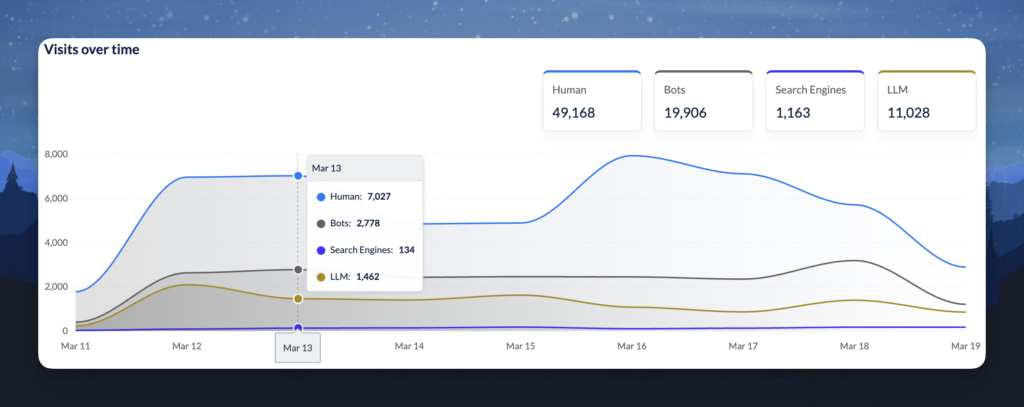
The Visibility Engine Dashboard breaks your site traffic into four distinct categories: Human, Bots, Search Engines, and LLM.
That last category is the one that changes the game. For the first time, you can see AI crawler traffic isolated from everything else. Not buried inside “bot traffic.” Not hidden behind a generic user-agent label. Separated, quantified, and identified by name.
When we turned the dashboard on for our own site at Alli AI, the LLM category immediately surfaced a volume of AI crawler visits that would have been invisible in any traditional analytics setup. Traffic from OpenAI’s crawlers, Perplexity, Claude, and others was all there, quietly requesting pages every day. We just couldn’t see it before because it was mixed in with everything else.
Your site almost certainly has a similar story. The dashboard is designed to surface it.
Built-In Traffic Filtering
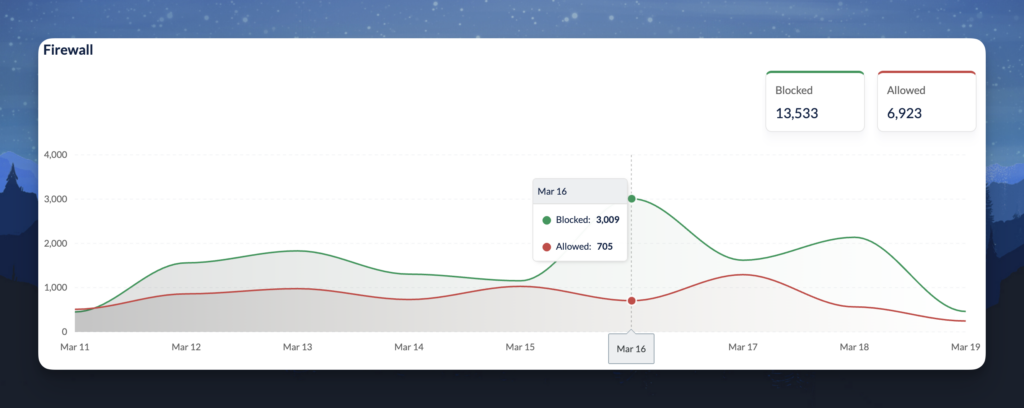
Not every bot that reaches your site deserves access. Scrapers, spam crawlers, and malicious bots hit web properties constantly. The Visibility Engine includes a Firewall panel that shows how Alli AI’s built-in filtering handles that traffic on your behalf.
On our own site, the firewall was blocking roughly twice as many requests as it was allowing through. That ratio is doing exactly what it should. The system filters out the noise, blocking bad actors and junk traffic, while allowing legitimate visitors and AI crawlers through to your content. You get the protection without having to configure firewall rules yourself, and without worrying that blunt-instrument bot blocking is accidentally shutting out ChatGPT or Perplexity along with the spam.
The panel gives you transparency into what’s happening at the infrastructure level. You can see the volume of blocked versus allowed traffic over time and spot any unusual spikes that might warrant attention.
See the Crawlers by Name
The dashboard doesn’t stop at categories. The Visitor Breakdown table identifies individual crawlers with granular detail: family, name, platform, type, and visit count.
On our site, we can see exactly which OpenAI crawlers are visiting (ChatGPT-User and OAI-SearchBot are separate entries with different visit volumes), which SEO tool crawlers are active (Ahrefs, Majestic, and others), and which AI platforms are showing up in the browser breakdown (Perplexity-User and Claude-User both appear).
You can filter the table by Human, Bots, Search Engines, or LLM to focus on exactly the traffic segment you care about. You can search by family, name, or platform. And you can sort by visit count to see who’s hitting your site the hardest.
This is the kind of visibility that turns AI search from an abstract trend into a concrete, measurable channel you can actually manage.
Why This Matters Now
There’s a strategic reason we built this, and it goes beyond dashboards and data.
Most tools that address AI search visibility stop at monitoring. They’ll show you whether your brand appears in AI-generated answers. That’s useful context. But it doesn’t tell you what’s happening at the infrastructure level. It doesn’t tell you whether AI crawlers can actually reach your content, how often they’re visiting, or what other bot traffic looks like.
The Visibility Engine Dashboard closes that gap. It shows you the full picture of who’s accessing your site, how often, what’s getting through, and what’s being filtered out. That’s the diagnostic layer.
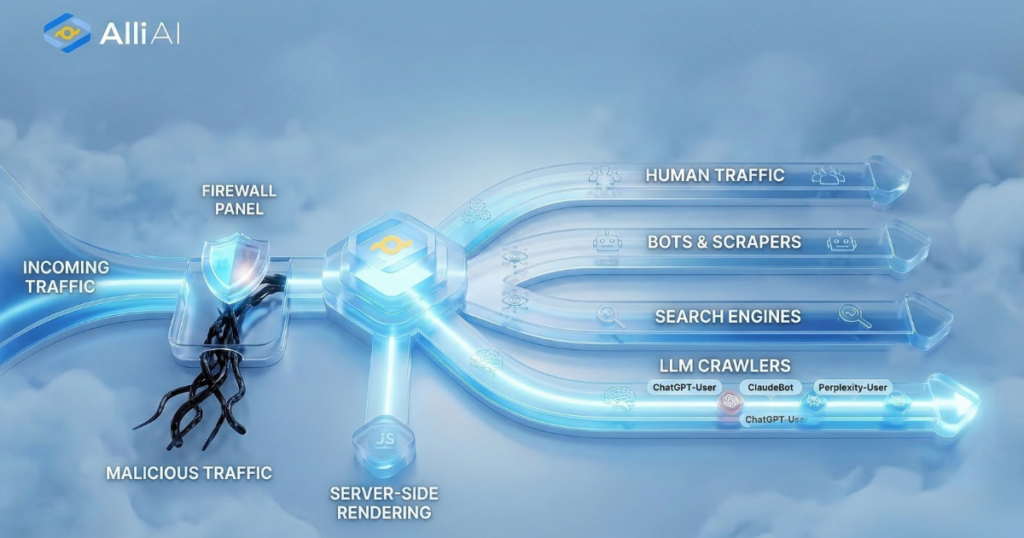
But diagnostics alone don’t fix anything. That’s why the dashboard lives inside the same platform that also serves pre-rendered HTML to 50+ AI crawlers through our server-side rendering infrastructure, and actively filters malicious traffic so legitimate crawlers get through cleanly. You see the data and solve the problem from the same place.
Monitoring without a fix is just an expensive way to watch a problem get worse. Fixing without monitoring is guessing. You need both.
What to Do With This Data
If you’re an Alli AI customer, the dashboard is live in your account right now on every plan. Here’s how to get value from it immediately.
Check your LLM traffic. Log into your dashboard and look at the LLM category in the Visits over Time panel. Is it growing? Flat? Nonexistent? This tells you whether AI crawlers are reaching your site at all.
Review your firewall activity. Check the Firewall panel to see how much malicious traffic Alli AI is filtering on your behalf. The blocked-to-allowed ratio gives you a sense of how much junk is being kept away from your site and your AI crawler interactions.
Identify your top AI crawlers. Open the Visitor Breakdown table and filter by LLM. Which AI platforms are visiting? ChatGPT-User and OAI-SearchBot indicate OpenAI’s crawlers. Perplexity-User and Claude-User show other major platforms. If you see certain platforms missing entirely, that’s a signal worth investigating.
Compare across time ranges. Use the 7d, 14d, 30d, and 90d toggles to spot trends. Is AI crawler traffic increasing month over month? Are new crawlers appearing? Trends matter more than snapshots.
Act on what you find. If AI crawlers can’t reach your content because your site is built on a modern web stack, the Visibility Engine’s server-side rendering handles that automatically. If you’re seeing AI crawler categories you didn’t expect, or not seeing platforms you hoped for, that’s a signal to dig deeper into your content strategy or site configuration. The data and the infrastructure to act on it live in the same place.
Available on Every Plan
The Visibility Engine Dashboard is included in all Alli AI plans, from Business through Enterprise. There’s nothing extra to enable. If you have an account, the dashboard is already populated with your data.
For existing customers: log in and check your LLM traffic today. The numbers might surprise you.
For everyone else: this is what it looks like when monitoring and infrastructure work together instead of living in separate tools. If you want to see your own data, [start here].
The Visibility Engine Dashboard is live now for all Alli AI customers. Questions? Reach out to our team via live chat or email.